New Project Launched: Spectacular.Gift
It began like this: Amazon.com’s vast product catalog contains many clever and unique items, the sort that you may not know you wanted until you’ve heard of it. Alternately, these items might make an ideal gift when shopping for the person “who already has everything”. So I figured it would be a neat idea to curate a collection of these items and build a gift recommendation site around them. Doing so would allow me to explore some new server-side technologies and help keep my skills fresh.
Technologies used:
- Ubuntu VPS from Linode
- Apache2 HTTP server
- Apache Tomcat 7
- Apache ActiveMQ
- Spring 3.1 with Spring MVC
- PostgreSQL 9.3
- HTML5 + CSS3
- jQuery, flot, TinyMCE
- Java libraries such as Joda Time, Jsoup, Jackson, Logback, and Commons DBCP
- Amazon Product Advertising API
- Reddit REST API
To get some data populated in the database as a starting point, I set up a scheduled task to pull data from several Reddit forums where Amazon links are shared. Reddit conveniently makes this data available via their REST API. All products discovered in this way are set to unapproved status pending manual review.
Next, I set up another scheduled task to populate and refresh metadata about the products via Amazon’s Product Advertising API. Per Amazon’s terms in order to display price information, this data has to be refreshed hourly. For efficiency I request data on batches of ten products at a time, which is the maximum limit.
I created a manual process for reviewing and approving products to be shown. This process includes writing a custom description, adding relevant tags (e.g. “For Kids” or “Gadget Lovers”), and setting an age range and gender specificity (if applicable).
The UI is written in JSP and outputs HTML5. Some features are powered by javascript, such as the price history button which uses flot to render the graph of historical price data.
Spring 3.1 ties it all together. Spring MVC handles the front-end. Spring JDBC is used for interacting with PostgreSQL. I could have used Spring’s event system, but I wanted to get some experience with ActiveMQ. There are a number of message senders and listeners set up for events such as “price changed” or “product suggested”.
I’ll probably think of a snappier name eventually, but for now I registered http://spectacular.gift (new “.gift” TLD). Have a look if you like! It’s basically in beta, and I’m still adding new products and tags.
Selecting Rows With Chinese Characters in MySQL
…or Russian/Cyrillic characters, or Arabic, or any characters of non-latin origin.
On this blog, I’ve let tons of spam comments pile up in the pending queue. Their number grew to the point of being completely unmanageable. Finally I decided to clean it up, and I had to find a way to bulk delete rows from the wp_comments table in the WordPress database. One thing I noticed was that hundreds, probably thousands, of spam comments contained Chinese characters. Other comments contained Russian or other non-latin characters. But how to select comments in which non-latin characters appear without selecting for specific strings (for example by using LIKE or REGEXP)?
It turns out the way to do it is like this:
SELECT  *
FROM    wp_comments
WHERE   comment_content != CONVERT(comment_content USING latin1)
CONVERT … USING will convert the column value to the specified character set, replacing any characters that do not map into the set with a question mark. If there are no Chinese/Russian/etc. characters, the output of CONVERT … USING will be the same as the unconverted column value.
This was the SQL statement I used to delete the unwanted posts:
DELETE FROM wp_comments
WHERE   comment_content != CONVERT(comment_content USING latin1) AND
        comment_approved = '0'
If there is any interest, I can post some other SQL statements I used to clean up the spam.
Why are JSPs so slow? (Tomcat 7 vs. Apache)
It would be unreasonable to expect JSPs to be served at the same rate as static files. Even after being compiled, requests to JSPs must pass through layers of servlet container code, not to mention the latency of the JSP code itself. However, the difference between static files vs. JSP is much larger than I would have expected.
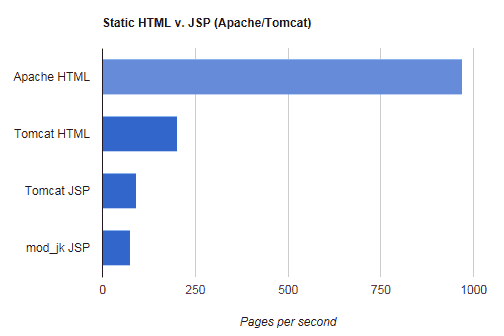
I ran a test on a 6KB HTML file using Apache Benchmark on my Dell Inspiron N7010 laptop, using 1,000 requests @ 10 concurrent requests. I also created a JSP by pasting the same HTML into a file, adding only a few dynamic elements: outputting the of the host name, port, and app URI. No calls to any beans, JDBC, or other potentially slow resources were made. Default installations were used for both Apache and Tomcat 7. The results were stark:
- Apache static HTML file: 971.25 pages/second (blazin’)
- Tomcat 7 JSP file: 92.5 pages/second
As you can see, the JSP is not merely slower. It is a full order of magnitude slower. Because the dynamic content is trivial in this test file, the performance of the servlet container fully accounts for this difference.
I thought I’d also test loading the JSP through Apache using mod_jk to see what kind of performance penalty this imparts. Results:
- Tomcat 7 JSP file via Apache mod_jk: 74.80 pages/second
So in this test case, there was a 19% performance penalty fronting Tomcat with Apache. Of course speed is not the only consideration when evaluating using this type of setup, but it is something to weigh against other concerns.
There is also a debate about whether Tomcat or Apache is faster at serving static files. This test is only one data point, but Apache easily wins here. Tomcat serving the static 6KB file:
- Tomcat 7 static HTML file: 203.5 pages/second
In this test, Apache was nearly five times faster at serving this file (though more than twice as fast compared to the JSP version).
And now, for people who like charts. =)
Spam in WordPress Comments
This blog is only a few weeks old, and I’ve managed to attract 12 comment spam attempts. 86% of the comments so far have been spam. When I was initially configuring WordPress I selected moderated comments, so I’ve had to review each one manually. Most spams are of the variety that attempt to fool the blog owner into thinking it’s a real comment. “That was interesting. I’ll have to think about it a little more.” I suppose these are all automated.
I’ve briefly looked into spam filter plugins. I was about to enable Akismet when I learned it is a pay service. I can’t justify paying for spam filtering on a new blog with few comments. If anyone has any plugin recommendations, please share in the comments. I promise to approve all legitimate responses! 🙂
UPDATE: I’m up to 92% spam comments now. I guess the bots are starting to discover this blog.
Best stats plugin for WordPress: ShortStat
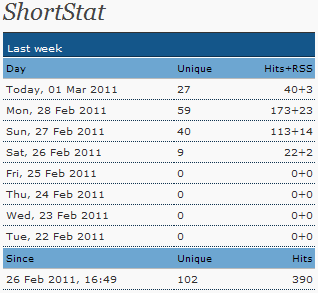 This is just my opinion, based on what I was looking for, which is: a very simple WordPress blog plugin for gathering and reporting stats like unique and total hits, referrers, and search keywords. I wasn’t interested in a heavy-weight stats program. I already use Google Analytics, but for this blog I wanted a plugin to put exactly the stats I’m interested in on my WordPress dashboard.
ShortStat does exactly what I want. It’s a simple and (as of this writing) actively-maintained WordPress stats plugin that provides a quick dashboard link, putting your stats a mere click away. Read more
Groupon says what?
I can’t be the only one who finds “Groupon Says” completely pointless. The sayings certainly aren’t “hyper-factual”, and neither are they humorous. It just seems bizarre that a big-name company like Groupon would put this sort of thing on all their pages. And, why a cat? I guess the feature is supposed to add a quirky idiosyncrasy to the site, to make it more endearing and less corporate. But it comes across like an idiosyncrasy as designed by committee. I can just imagine how it went: “I have an idea! Let’s add a picture of a cat! Internet denizens seem to love pictures of cats.” “Brilliant!”
Using word clouds for SEO keyword analysis
Wordle is an online tool that creates “word clouds” out of text. Basically, you feed it some text and it generates an image of jumbled up words, with the size of each word determined by how frequently it is repeated. One way to think about it is, Wordle gives you a rough idea of how a search engine spider sees your page. This may be helpful in your SEO efforts.
For example, here is a word cloud of my blog post on geolocation. (click for larger size)

Instantly, the main theme of the post jumps out, with words such as “geolocation”, “city”, “code” and “GeoIP” featuring prominently. Then you also see secondary words, such as “region”, “PHP”, and “database”, adding additional context. In SEO terms, the larger words are your keywords. The font size represents your keyword density.
Another word cloud after the jump: Read more
Censorship on Facebook – Others can’t see your posts
Facebook seems to be employing a troubling, sneaky sort of censorship algorithm that is applied when people post to the pages of organizations, politicians, etc. It appears to be a form of the “Tachy goes to Coventry” ignore function seen on vBulletin, by which I mean: your posts are visible to you, and all appears perfectly normal; however, nobody else sees your posts. What makes this troubling is that it appears to happen via algorithm rather than human intervention, and there is no notification to the user that his or her posts are invisible to others. In fact, like the vBulletin functionality, it seems intentionally designed to mislead the user into believing his or her posts are appearing normally.
Glossy Screens on Laptops Suck
I understand why glossy screens have completely overtaken matte screens; glossies look a lot sexier on display at the store. Images and videos are shown in vivid, eye-catching color and contrast that matte screens cannot achieve. However, the flaw of the glossy screen is easily overlooked at the store display.
I purchased a glossy screen model several years ago, when they were just becoming popular. It was not long before I noticed how much glare these screens pick up. They reflect light like a mirrored surface! In certain light conditions glossy screens are completely unusable, where a matte screen would be acceptable. I found myself often adjusting the screen, tilting it, turning it, to minimize the glare. It became a constant annoyance.
Now I’ve gone laptop shopping once again, and my local Best Buy no longer carries a single matte screen model. Glossies have completely overtaken. Where is the consumer choice? I realize that the colors on matte screens don’t “pop” like they do on glossies, but that’s a sacrifice I’d make to be rid of the annoying glare problem.
The few matte screen laptops I’ve found for sale online tend to be Thinkpads and other business-focused models. If I were to limit myself to matte screens only, my selection would be pretty thin. I guess I’ll likely suck it up and reluctantly go with a glossy.
UPDATE: what a sad, yet prescient comment (from 2006!) I came across on this topic:
The glare is terrible and you can’t use the laptop outside at all. The side viewing angle is totally destroyed because looking at the screen from the side looks just like a mirror.
What in the world were they thinking? I sure hope that this does not become a major trend.