
Dell Inspiron 17R / N7010 Review
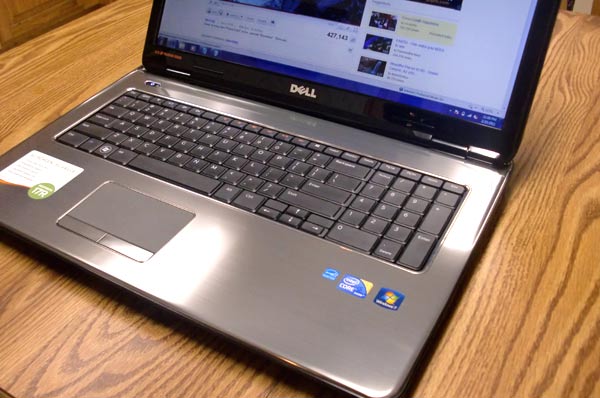 I believe in getting the most out of existing hardware, but my aging Averatec laptop (purchased in 2005) was beginning to give me trouble, as old hardware will do. Additionally, the old machine could not be counted upon to run an IDE like Netbeans. It just lacked the horsepower.
So I’ve been doing a lot of research into mid-range consumer laptops, reading reviews, trying to find the one that strikes just the right balance between price and features. I ended up purchasing a Dell Inspiron 17R (aka N7010) from Staples, on clearance for $600.
This model is a 17.3 inch Core i5 machine with 4 GB of RAM and a 500 GB 5400 hard drive. The dual-core i5 processor provides ample horsepower at 2.53 GHz, with turbo boost to 2.8 GHz. Unlike the i3, the i5 features Intel’s hyperthreading which simulates four cores. The i5 is more than adequate for handling multitasking and code compiling.
My model lacks a blu ray player. It also lacks a dedicated graphics card. This is what helped hold down the price, and because I don’t plan on gaming with this machine, I don’t expect the Intel integrated graphics to be a problem. My only concern would be running Photoshop CS5.
The 17.3 inch screen is beautiful at 1600×900 resolution, but it suffers from glossy screen syndrome. On the bright side, it features LED backlighting. (I’m so witty.) I believe all Dell laptops have LED backlighting now.
The design is sleek, with a faux brushed metal appearance. The gray palm rest area does not really show fingerprints, but the charcoal gray outer case does. Overall the laptop feels sturdy, not cheap and flimsy. It does lack a latch, so when the screen is down there is nothing locking it closed.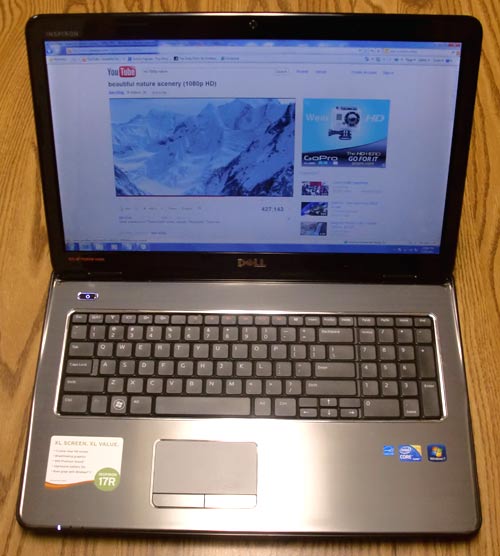
I like the keyboard very much. I was concerned after going to Best Buy and inspecting an AMD chip Dell Inspiron that looked identical to the Intel-based 15R / 17R. The keyboard on that model was the worst in the store, with horrible flex and cheap, rattling keys. But when I checked out the 17R at Staples, I found the opposite: the keyboard has almost no flex, and the keys have a very satisfying tactile feel when typing. A solid keyboard is absolutely crucial on any laptop, and a poor one would’ve been a deal-breaker for me. My only issue is a slight rattle in the zero key on the number pad, which I think I can fix just by wedging something soft underneath.
After correcting a problem with my Linksys access point, the 17R’s wireless connectivity has worked without a hitch. I haven’t noticed any connection dropping so far, and laptop reports a strong signal consistently.
Battery life is decent. It will last three to three-and-a-half hours on a full charge, which is not bad for a 17 inch model.
The 17R’s touchpad is a good size and is appropriately placed to avoid accidental touches while typing (there is a touchpad disabling button as well). I’m happy with the sensitivity and feel, and have no need for a laptop mouse. The touchpad supports multi-finger gestures as well. I wish it were possible to configure these. Dell chose to use a three-finger gesture for “forward” and “back” browser functions, which I find very cumbersome. My former laptop performed these functions with a one-finger swipe at the top of the pad. I’m going to miss the ease of that gesture.
The speakers actually surprised me with the volume they are able to produce. You can crank them up quite loud. However, as with all laptops, the sound quality is not the best. It is decent, though. Speaker placement is odd. Instead of being ontop near the screen, they are in the front on the tapered underside. This may result in their becoming partially blocked if you’ve got the laptop on your lap.
All in all, I am quite satisfied with the Dell Inspiron 17R and would recommend it. If you can find it for $600, it’s a real value. Shortcomings: I would’ve liked 6 GB of memory, and a dedicated video card would be nice. (17R’s are available with these options.) A matte screen would be excellent, but they’re a dying breed. If you’re looking for solid construction, a quality keyboard, a powerful processor without the i7’s cost, and a brand with a strong reputation, all for a competitive price, give the 17R a look. I hope this review has proven useful.
yes was really useful, i am software developer myself so was looking for a new development machine u think i need to upgrade to memory card or or 6gb ram? or your programming software’s work just fine?
Everything works brilliantly for me, but again I am not using graphics-intensive software. That would be the major weakness. This Inspiron 17R/N7010 gets the following scores on the Windows Experience Index:
If 4 GB of RAM proves not to be enough in the future, it would be an easy upgrade. But for now it’s fine.
The 17R pictured is a ‘first generation’ intel I5 processor – that’s why it was on the clearance rack. I recently bought a 17R – N1710 2nd Gen and it has the 2.3 Quad-core I5 with Intel graphics (dedicated) built in to the processor. This 2nd gen design does away with the ‘front-side bus’, making the graphics much more responsive. I ordered it with the optional ($100) nVidia graphics card and upgraded it to 8 gb. dual-channel ram. I don’t believe there is a faster laptop around for the money. It was $799.00 from Dell + $85 for 2 x 4096 mb. Patriot Signature ram.
Your keypad has many options apparently you are not aware of. Click on ‘mouse’ in the control panel and you’ll see a link to the settings when the mouse window opens, hope this helps.
I bought this laptop almost a year ago for 999.99. came with an I5 and 6GB of ram. Has 1gig dedicated graphics memory. I do love this laptop. The only thing is that it DOES NOT have a true wireless N card in it. I fought for months with dell over this. Now every time I call, they say they will call me back and nobody ever does, has happened about 4 times now. They have sent me 3 different cards, all are not wireless N. They keep saying that since the card transfer rate is faster than 54 megs, that its wireless N which is completely false. The card that I finally settled with transfers at 117 megs/sec which is still not wireless N. for you that do not know. standards of wireless n is 150-300 megs/sec, if under 150, is considered wireless g still. I have fought tooth and nail with dell for a true wireless N card with no result. As a consumer, I will not be purchasing another Dell again.
Just ordered a Inspiron 17R which I should receive within one week. After comments read, I am confident that I will be happy with my purchase.